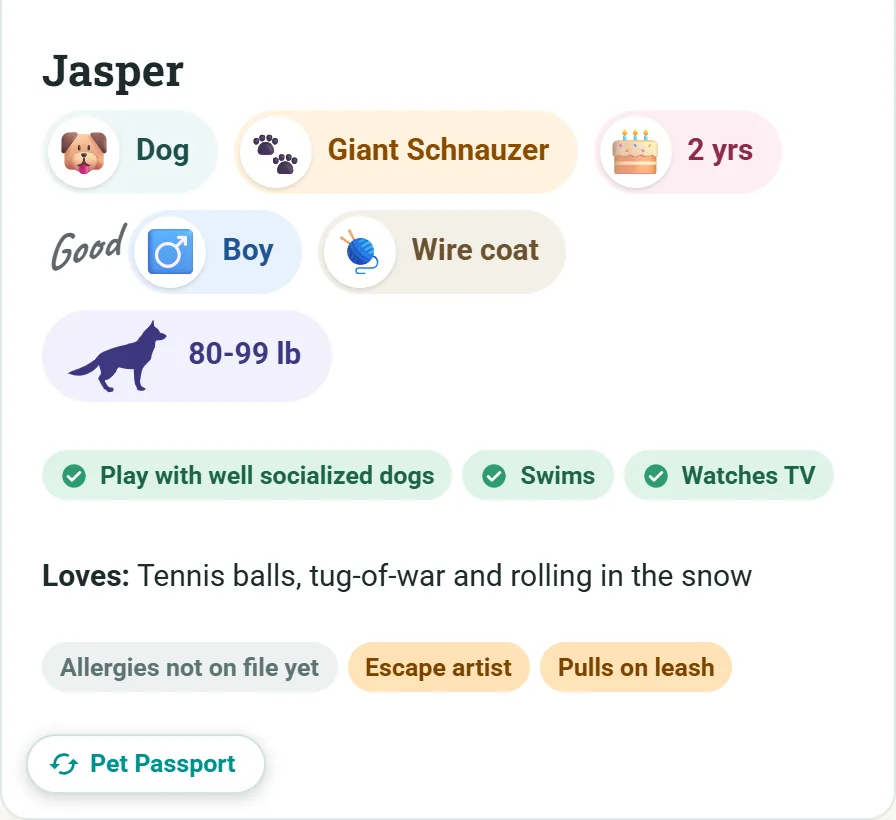
The front shows your pet's photo, name and badges (kind, breed and more), chips for the good news like Rabies vax current or No allergies, the meters, what they love, and chips for the heads-ups: allergies, behaviors to watch and dislikes. The back is the Pet Passport.
Who sees it
Anyone who can see your page sees the front. Only your family, our Pros and our office see the meters and can turn the card over. Visitors never get the back. A Parent with Change the pets on, our Pros and our office can change it.
How to use it
Tap Pet Passport, at the top or bottom of the card, to turn it over. Tap Profile to turn it back.
To change the photo, turn the card over and tap the photo.
More than one pet? On the back, use the Move arrows to put the cards in your order.
Adding a pet? Tap + Add a pet under the cards.
Good to know
Medication shows on the front only if you choose Everyone who sees my page. Otherwise only your family and our Pros see it, on the back.
Rabies vax current shows only while the rabies date on file hasn't passed.
Allergies not on file yet means nobody has told us either way.
A pet who's no longer with you moves under Not with us, with the date if you give one.
Two homes? Also lives with shows whose home it is, to your family, our Pros and our office only.